
Collaborative Editing
Several people can edit the same page at once and see each other's changes as they type. Whoever starts editing hosts the session and decides who can join.
Start a Session
Click the pencil icon on a page to start editing. You are now the host, and by default anyone else who can edit the page can join you straight away.
To change who can join:
-
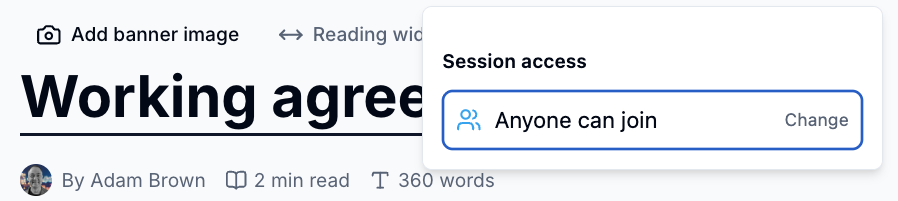
Click the session access icon in the edit toolbar
-
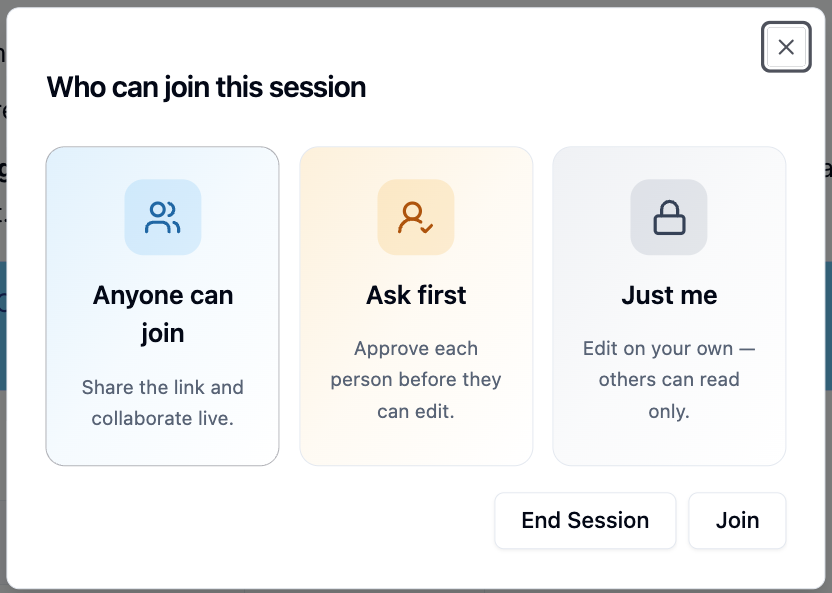
Click Change and pick an option
| Option | What happens |
|---|---|
| Anyone can join | Others who click the pencil join you straight away |
| Ask first | Others send a request, and you approve each person |
| Just me | Only you can edit. Everyone else can read only |
A brand-new page always starts as Just me.
Join a Session
Click the pencil on a page someone is already editing:
- If the session is Anyone can join, you join straight away
- If it is Ask first, you see who is editing. Click
Request to Joinand wait for the host to approve you - If it is Just me, the page is locked until the host finishes
While you are in the session you see everyone's named, coloured cursors. The host's toolbar shows the avatars of everyone editing.
Approve Requests
When someone asks to join, the session access icon shows a count.
- Click the session access icon
- Under Requesting to join, click
Approvenext to the person
They join the session straight away.
Save and Finish
Only the host can save. Everyone's changes are included when the host clicks Save.
- Collaborators click
Leave sessionto go back to reading - The host clicks Save to save everyone's work and finish, or End session to send everyone back to reading mode
Save before ending the session
End session doesn't save. Anything not yet saved, including your own changes and work in other people's windows, is lost. Click Save first.
If the host leaves
Hosting can't be handed over. If the host closes the page or loses their connection, the session ends for everyone.
Please contact us if you have any questions.