
Decisions
Decisions get made in meetings, threads and hallways - and then forgotten. A Decisions card records what was decided, why, and what else was considered, right where the conversation happened. A Decisions report then brings every decision together into one log.
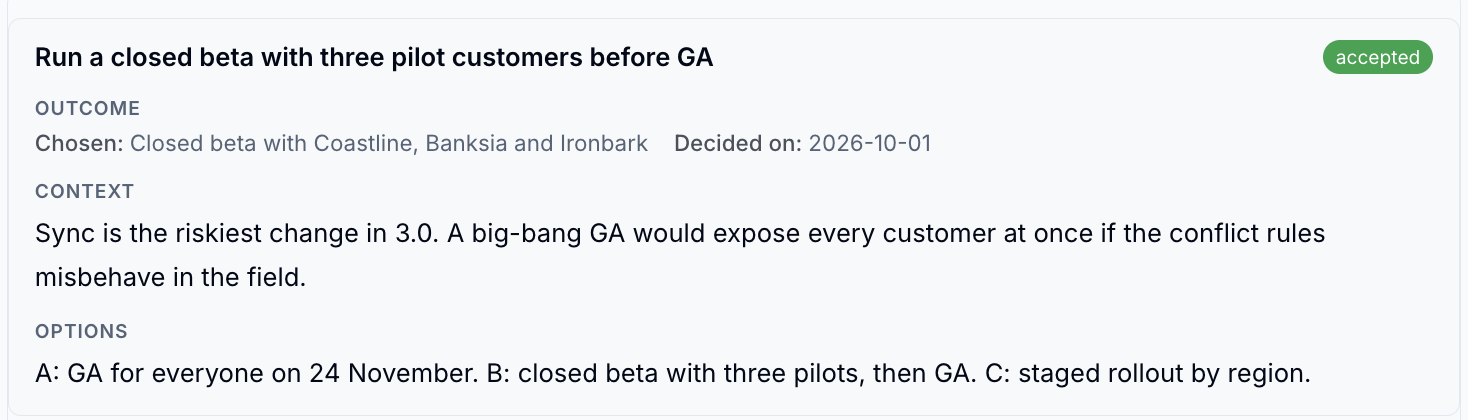
Record a Decision
- While editing, type
/decisionand choose Decisions - Give the decision a title, such as "Run a closed beta before GA"
- Set the status: proposed, accepted, superseded or rejected
-
Fill in the outcome:
Field What to enter Chosen The option you went with Decided by Who made the call Decided on When Supersedes An earlier decision this one replaces Context Why a decision was needed Options What you considered -
Save the page
Replace an Earlier Decision
When you change your mind, record a new decision and link the old one in Supersedes. The old card then shows "Superseded by" with a link to the new one, and the Decisions report marks it as superseded.
Update the old status too
Linking a decision doesn't change the old card's status. Set it to superseded yourself so the log reads clearly.
Build a Decision Log
- On a page such as "Decision log", type
/decisionand choose Decisions report - Choose the scope - this page, its sub-pages, the whole wiki or selected wikis
The report lists every decision in that scope, with filters, search and export, just like any other properties report.
Templates with decisions built in
The Weekly team meeting, DACI decision, Decision matrix, Architecture decision record and Technical RFC templates include a Decisions card ready to fill in.
Please contact us if you have any questions.