
Search
Search finds pages by what they say, not just their titles. It looks through every wiki you can access and shows only the pages you are allowed to read.
Search for a Page
- Click Search... at the top of the screen
-
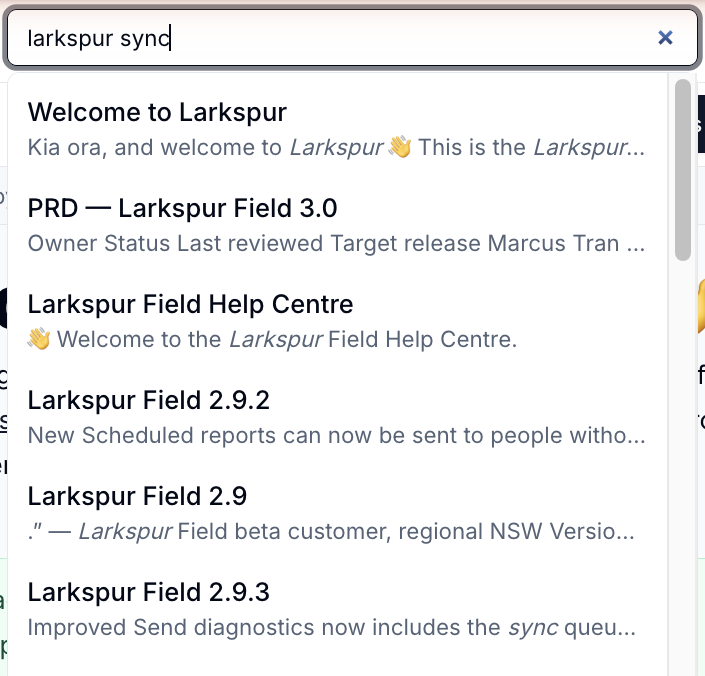
Type at least two characters. Results appear as you type
-
Click a result to open the page, or press
Enterto open the first one
Each result shows the page title and a snippet with your search words highlighted.
What Search Covers
- Page titles, headings, text and page property values
- Pages in every wiki you can read, in your organisation
- The latest published version of each page
Search does not show draft pages, pages you don't have access to, or the wikis themselves.
Other Ways to Find Things
| Where | Box | Finds |
|---|---|---|
| Wikis home page | Search wikis | Wikis by name |
| My pages | Search pages | Your pages by title |
| Inside a wiki | Filter pages | Pages in that wiki by title |
On smaller screens
The search box is hidden on phones and narrow windows. Widen the window, or use Filter pages inside a wiki.
Administrators
Platform administrators can rebuild the search index from the user menu if results look out of date.
Please contact us if you have any questions.