
Page Restrictions
Most pages should be open to everyone in the wiki. For the few that shouldn't - draft board papers, salary bands, a page only a few people should change - wiki owners can restrict individual pages.
Restrict a Page
Only wiki owners can change page restrictions.
- Open the page
- Click the lock icon in the page header
-
Under General access, choose who can see and change the page:
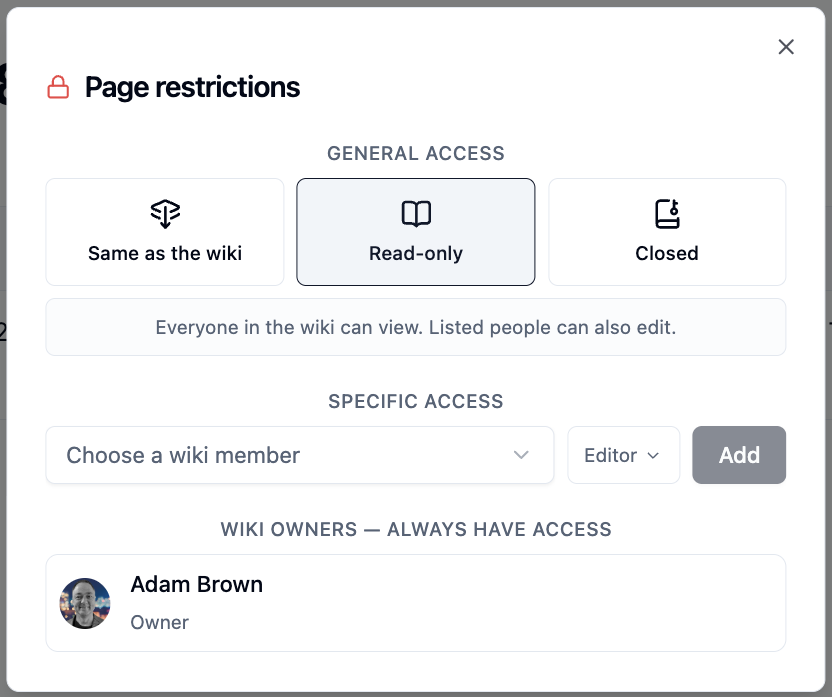
Option Who can view Who can edit Same as the wiki Wiki readers and editors Wiki editors Read-only Everyone in the wiki Only people listed below Closed Only people listed below Only listed people with the Editor role -
Under Specific access, choose a wiki member, pick a role and click
Add
Changes are saved straight away. Wiki owners always have access to every page.
When a page is restricted, the lock in the page header turns red.

How Restrictions Work
- Sub-pages are hidden too - if someone can't view a page, they can't view anything beneath it either
- Edit rights never pass down - to edit a sub-page, people need to be allowed to edit that page itself
- The wiki still comes first - a page restriction can narrow access, but it can never give someone more than their wiki role allows
What Others See
People who can't view a restricted page won't find it anywhere:
- It doesn't appear in the page list or in search results
- A direct link shows "Page Not Found"
- Where the page is included in another page, they see a "Restricted content" notice
- A smart card linking to it shows "Restricted page"
Exporting a wiki with restricted pages
A wiki archive can only be exported by someone who can see every page. See Wiki Archives.
Default page
A page that is restricted to specific people can't be the page the wiki opens on.
Please contact us if you have any questions.