
WikiShift
WikiShift copies wikis into Huddo Wikis from one of two sources:
- HCL Connections Wikis
- Atlassian Confluence (Data Center / Server)
It runs as the wikishift service in your Huddo release, reads the source, and writes new wikis to Huddo: pages to the Wikis database, files to S3 storage, comments to Discussions, and users and groups to the user service. Set up the section for your source, then run a migration.
Migrated wikis open at Full width reading width, since Connections and Confluence pages are laid out for the whole window. Change the wiki default afterwards if you prefer.
Your source data is never changed
WikiShift only reads the source:
- Every query it sends to the source database is a
SELECT. - It only reads source files. It never writes, moves or deletes them.
- Re-migrating a wiki (
PURGE_MIGRATED_IDS) deletes only the Huddo copy: the wiki, its pages, comments and files in Huddo. Nothing in the source is touched.
Use read-only credentials
Give WikiShift a database user that can only read. On PostgreSQL WikiShift also opens every session read-only. On other databases it relies on the account.
HCL Connections
WikiShift reads the Wikis DB2 database and the Wikis upload folder on the Connections shared drive.
What is migrated
- Each wiki, with its pages and page tree
- Every page revision
- Attachments, with links in pages pointing at the new files
- Comments
- Tags, as labels
- Access: wiki members and their roles. A community wiki is owned by its community. Public wikis become visible to the organisation
Not migrated: likes, and who follows a wiki or page.
Users
Each person is found, or created, in Huddo by their Connections directory ID, with their name and email. An access entry for someone who can't be resolved is skipped, with a warning in the log.
Before you start
- Organisation. Content goes to the organisation of the
connectionsclient in Huddo whose URL isCONNECTIONS_URL. On Component Pack this comes from theconnections-envConfigMap, as it does for the user service, so there is nothing to set. - Network. The
wikishiftpod must reach DB2. - Files. Mount the Connections shared drive read-only, and point
SOURCE_FILES_DIRat its Wikis upload folder. - Stop new Connections wikis. Disable the Connections Wiki widget so new communities stop creating wikis that will need migrating.
Example
Component Pack values. Every setting is in WikiShift Configuration.
wikishift:
  enabled: true
  # Extends the chart's mongo-secret volume with the Connections shared drive
  volumes:
    - name: mongo-secret-vol
      secret:
        secretName: mongo-secret
        defaultMode: 420
    - name: shared-drive
      nfs:
        server: '[NFS_SERVER_IP]'
        path: /nfs/data/shared
  volumeMounts:
    - name: mongo-secret-vol
      mountPath: /etc/mongodb/x509
    - name: shared-drive
      mountPath: /data
      readOnly: true
  env:
    SOURCE_PROVIDER: connections
    DB_HOST: '[DB2_HOST]'
    DB_PORT: 50000
    DB_USER: '[DB2_USER]'
    DB_PASSWORD: '[DB2_PASSWORD]'
    TZ: '[DB2_SERVER_TIME_ZONE]' # e.g. Europe/London
    SOURCE_FILES_DIR: /data/wikis/upload
Wiki IDs for IMMEDIATELY_MIGRATE_IDS are Connections wiki library IDs.
Confluence
WikiShift reads Confluence Data Center or Server in one of two ways:
- The database (PostgreSQL, MySQL, SQL Server or Oracle) plus the
attachmentsfolder of the Confluence home. Best when you can give database access. - Space exports: XML export zips, one per space, made by a space admin. Use this when database access isn't possible. Confluence 9 has no site export.
Confluence Cloud is not supported yet.
Tested with
Both ways were tested end to end against Confluence 10.2 on PostgreSQL 16. MySQL, SQL Server and Oracle are supported but only covered by automated tests, not a live instance yet: on those, migrate a few spaces first and check the counts before migrating everything.
After migrating, redirect the old Confluence host so existing links open the migrated pages: see Reverse Proxy.
What is migrated
- Each space, as a wiki
- Current pages and the page tree. Drafts and trash are left out
- Every page version, with its version comment
- Attachments
- Comments. Inline comments are migrated, but resolved and open ones are not told apart
- Labels
- Links between pages, pointed at the migrated page. Links to an anchor land on the same spot. A link into another space works once that space is migrated too. A link to a page that doesn't exist becomes plain text
- Mentions, as the person's name in plain text
- Access: space permissions and page restrictions. See Permissions
- Macros: mapped to Huddo blocks where one exists. Others become a callout or code block, with a warning in the log
Not migrated: blog posts, whiteboards, databases, folders, page templates, archived spaces, multi-language pages, Marketplace macros, likes, watches, and recently viewed and contributor lists.
Permissions
Confluence grants space permissions one by one, to users, groups or everyone. Huddo wikis have three roles: owner, editor and reader. WikiShift gives each person one role, the strongest their permissions add up to.
Each space gets a Huddo group, named after the space, holding everyone with access and their role. The wiki grants each role in that group the same wiki role. Group grants are expanded to the group's members: the Confluence group itself is not copied, since it stops being maintained once Confluence is switched off.
Space permissions
| In Confluence | In Huddo |
|---|---|
| Admin (space permissions) | Owner |
| Add pages | Editor. Editors can also delete pages |
| View | Reader |
| View for anonymous users | Reader for everyone in the organisation. Migrated wikis are never public |
| Comment, Add attachments, Delete, Export, … without Add pages | Reader: those rights are lost |
| Add pages without View | Editor, so the person can now read the space |
| Several of the above, directly or through groups | The strongest of their roles |
| A permission given to a group | Each member of the group gets the role |
| A group whose members can't be read | Skipped, with a warning in the log |
| The space creator | Owner, where Confluence recorded one |
Warning
A space with no creator and no one WikiShift can find in its permissions migrates with no access at all, and the log says so. Add owners in Huddo after migrating.
Page restrictions
| In Confluence | In Huddo |
|---|---|
| No restrictions | The page follows the wiki's access |
| View restricted to people or groups | Only they can read it. Those also allowed to edit are editors, the rest readers |
| Edit restricted only | Everyone in the wiki can read it. Only the people named can edit |
| A restriction naming a Confluence group | A Huddo group with the same name and that group's members |
| A restriction naming someone WikiShift can't find | That person is left out, so the page is narrower than before, never wider |
| A View restriction naming nobody WikiShift can find | The page is left out, with its comments, its attachments and the pages beneath it |
A restriction applies to the pages beneath it, as in Confluence. Pages left out are listed in the log, and against their wiki on the Migrated tab in Huddo Admin.
Users
Confluence is switched off after the migration, so nobody signs in to Huddo with it. People sign in with the organisation's own provider, such as Microsoft 365 or Auth0.
Each Confluence user gets a placeholder user in Huddo, on the confluence client, carrying their Confluence email. WikiShift does not match them to existing Huddo users. When a person first signs in with the organisation's provider, Huddo matches their placeholder by email and links it to their account, so their migrated pages, comments and access follow them. The provider must be in the same organisation as the confluence client, and the person's email there must match the one in Confluence.
- A user whose Confluence directory entry is gone (a deleted user) still gets a placeholder, named
Deleted Confluence user (<key>)after their Confluence user key. - Content with no author, such as the homepage and sample files a space blueprint creates, is credited to the person who created the space. If the space has no creator either, it is credited to "Unknown author (Confluence)".
Before you start
- Organisation. Register a
confluenceclient in the target organisation, with the Confluence site URL as its base URL. Set the same URL asCONFLUENCE_URL. Content and placeholder users go to that organisation. The client only identifies the source: nobody signs in with it. - Sign-in provider. The same organisation needs the provider people will sign in with after Confluence is switched off, such as Microsoft 365 or Auth0, with the same email addresses as Confluence.
- Database reader: the
wikishiftpod must reach the database. Mount<confluence-home>/attachmentsread-only atSOURCE_FILES_DIR. Attachments must be on the Confluence filesystem: WikiShift can't read attachments a Data Center site stores in Amazon S3 yet. Support is coming soon: email us to enquire. Until then, use space exports for such a site. SetTZto the Confluence server's time zone: Confluence stores dates with no offset, so a wrong zone moves every migrated date. - Export reader: put the export zips in one folder and mount it at
CONFLUENCE_EXPORT_DIR. A zip is read whole into memory, so unpack very large exports first. A file in a zip that would unpack to more than 1 GiB is refused withExportEntryTooLargeError, so a corrupt export cannot exhaust memory. SetCONFLUENCE_EXPORT_TIMEZONEto the time zone of the Confluence server that made the exports — exports store times with no offset, so a wrong zone moves every date. It defaults toTZ.
Example: database
Every setting is in WikiShift Configuration.
wikishift:
  enabled: true
  # Extends the chart's mongo-secret volume with the Confluence attachments
  volumes:
    - name: mongo-secret-vol
      secret:
        secretName: mongo-secret
        defaultMode: 420
    - name: confluence-attachments
      nfs:
        server: '[NFS_SERVER_IP]'
        path: '[CONFLUENCE_HOME]/attachments'
  volumeMounts:
    - name: mongo-secret-vol
      mountPath: /etc/mongodb/x509
    - name: confluence-attachments
      mountPath: /confluence/attachments
      readOnly: true
  env:
    SOURCE_PROVIDER: confluence
    CONFLUENCE_URL: https://[CONFLUENCE_HOST]
    SOURCE_FILES_DIR: /confluence/attachments
    DB_TYPE: postgres
    DB_HOST: '[DB_HOST]'
    DB_DATABASE: confluence
    DB_USER: '[READ_ONLY_USER]'
    DB_PASSWORD: '[PASSWORD]'
    TZ: '[CONFLUENCE_SERVER_TIME_ZONE]' # e.g. Europe/Zurich
Example: space exports
wikishift:
  enabled: true
  volumes:
    - name: mongo-secret-vol
      secret:
        secretName: mongo-secret
        defaultMode: 420
    - name: confluence-exports
      nfs:
        server: '[NFS_SERVER_IP]'
        path: /exports/confluence
  volumeMounts:
    - name: mongo-secret-vol
      mountPath: /etc/mongodb/x509
    - name: confluence-exports
      mountPath: /confluence/exports
      readOnly: true
  env:
    SOURCE_PROVIDER: confluence
    CONFLUENCE_URL: https://[CONFLUENCE_HOST]
    CONFLUENCE_EXPORT_DIR: /confluence/exports
    CONFLUENCE_EXPORT_TIMEZONE: Europe/Zurich
Wiki IDs for IMMEDIATELY_MIGRATE_IDS are Confluence space keys.
Run a migration
There are two ways to start a migration:
- From Huddo Admin: pick wikis, migrate them and watch them go. Use this for most migrations.
- On startup: list wiki IDs in the release values. Use this when nobody can sign in to Huddo Admin yet, or to script a run.
Both use the same queue, so a run started either way shows in Huddo Admin.
From Huddo Admin
Organisation admins open Huddo Admin from their user menu, then Wiki migration. The section appears only where WikiShift is deployed.
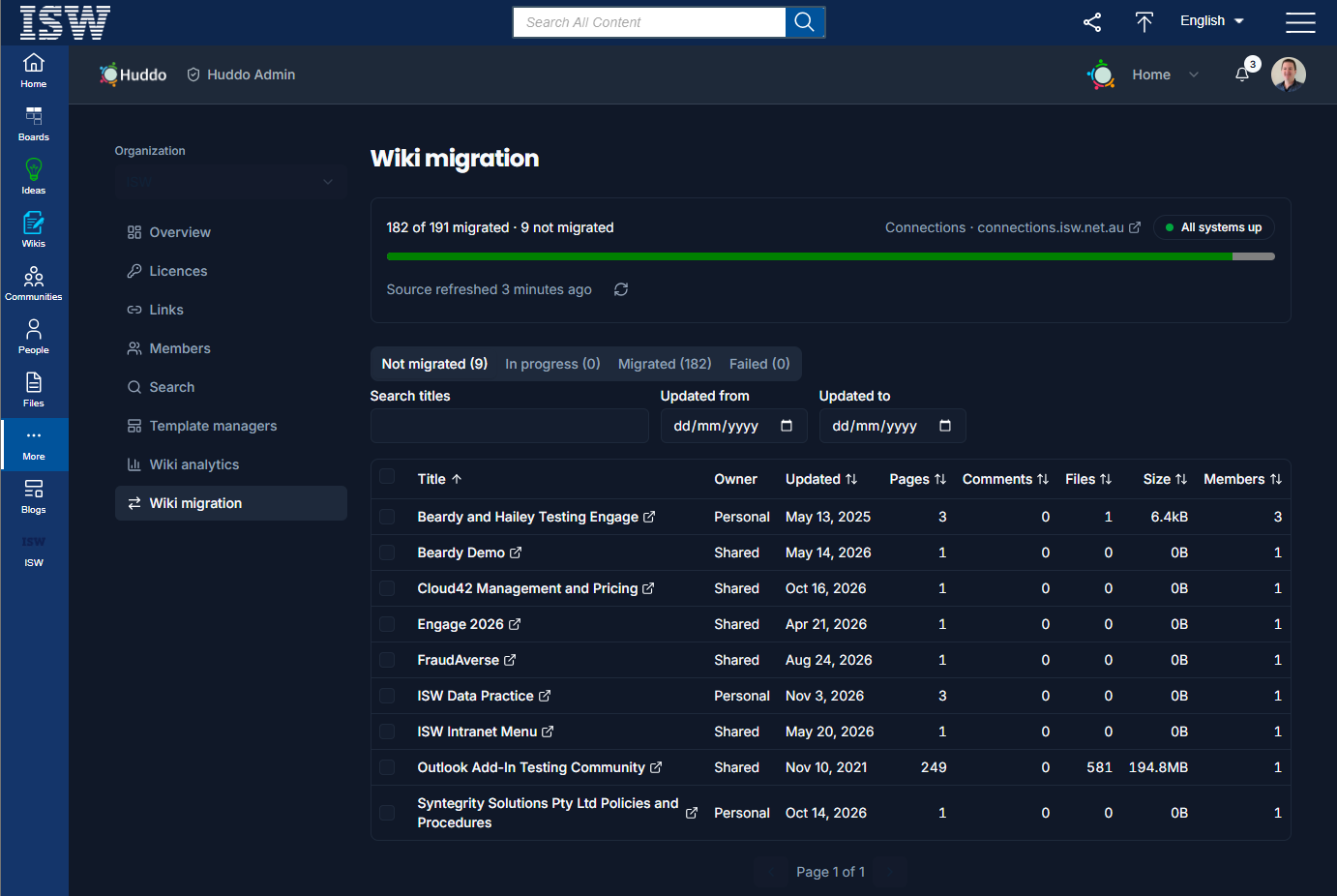
The summary
The line at the top says where the migration stands:
| It says | When |
|---|---|
| N wikis in the source · none migrated yet | nothing has been migrated or has failed yet |
| Migrating · N of M done | wikis are queued or running, with how many of each and how many failed |
| N of M migrated | nothing is queued or running, but some wikis are not migrated or failed |
| Complete: all N wikis migrated | every wiki in the source is migrated |
Beside it:
- The source system: Connections or Confluence and its host. Click it to open the source in a new tab.
- The health badge: All systems up, or Down: and what is down: Source (its database or export folder), Source files, Organisation or Live updates. While the source, its files or the organisation is down, migrating is paused: the Migrate button is disabled and the page says Migration is paused: … unavailable. Live updates only carries progress to the page, so migrations run without it.
Below the progress bar it shows how many wikis were migrated in the last hour, and when the source list was last read. WikiShift reads the source's list of wikis when it starts. Click refresh to read it again, for example after adding wikis or spaces to the source.
The tabs
| Tab | Lists |
|---|---|
| Not migrated | wikis not migrated yet, and migrations an admin cancelled (marked Cancelled) |
| In progress | wikis queued or running |
| Migrated | wikis in Huddo, with a check of their counts against the source |
| Failed | wikis whose last migration failed, with the reason |
On every tab you can search titles, and filter by when the wiki was last updated in the source (Updated from, Updated to). Click a column heading to sort by it, and again to reverse the order. Size is the total size of the wiki's attachments in the source. Click a title to open the wiki in the source.
Migrate wikis
- On Not migrated, or Failed to try again, tick the wikis. The tick in the heading selects every wiki on the page. Once a whole page is ticked, Select all N matching selects every wiki that matches the search and filters, on every page.
- The bar at the bottom shows how many wikis, pages and files you selected, and their size. Click Migrate.
- Check the numbers and click Migrate again. Wikis already queued, running or migrated are skipped.
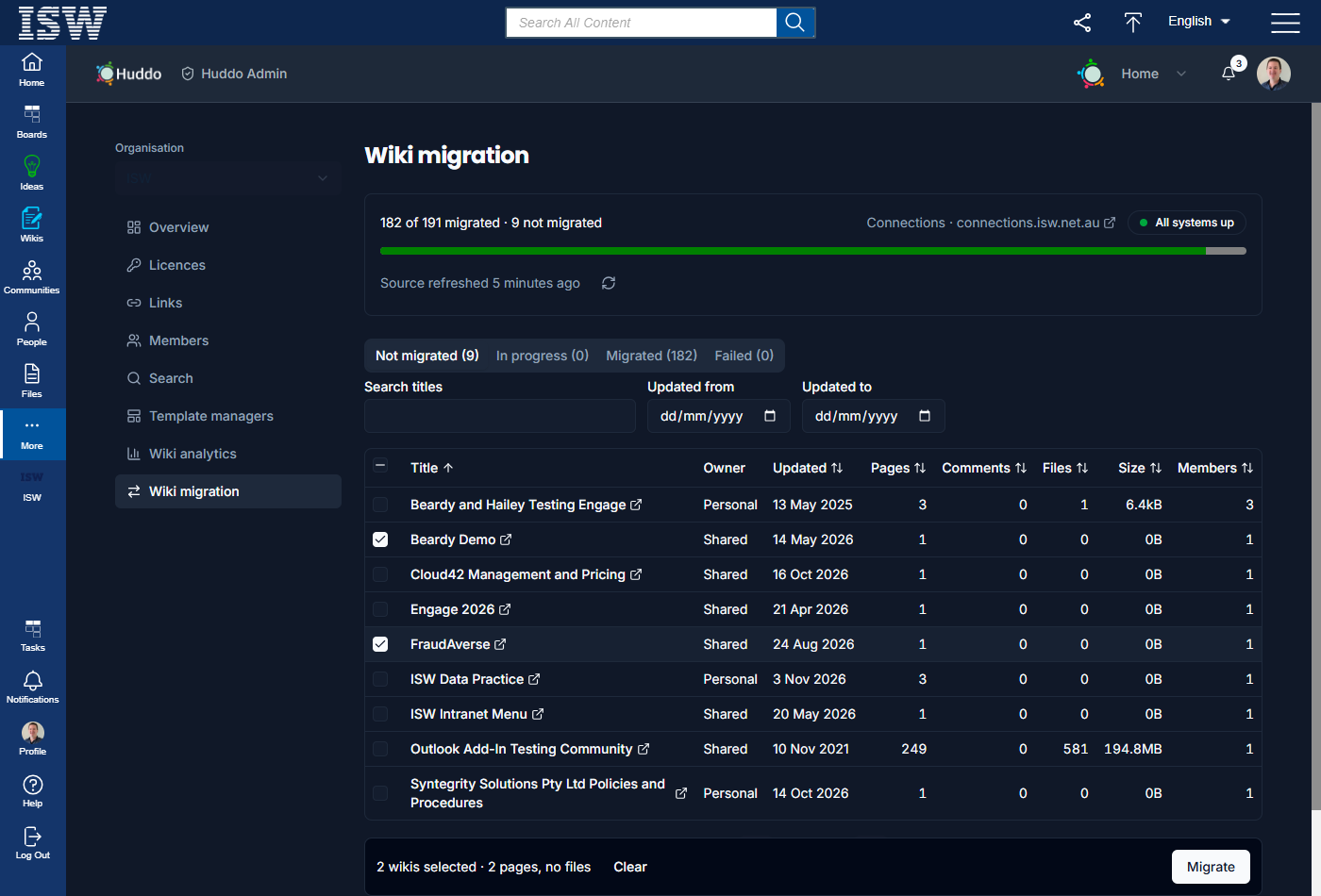
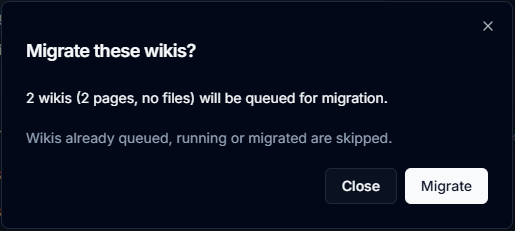
You can tick up to 1,000 wikis at a time. For more, use Select all … matching.
When you migrate again from Failed, the dialog also offers Migrate even if page content is missing. A wiki fails when the content of a page's current version is missing from the source. Tick this to migrate that page with a notice in place of its text: This page's content was missing from the source when it was migrated. Without it the wiki fails again. Missing attachments and old page versions never fail a wiki: they are skipped and listed on the Migrated tab.
Follow progress
In progress shows each wiki's state (Queued, or the step it is on and how far it has got, such as Pages 12/40), how long it has been running, and who queued it. Wikis started on startup show System (startup). The page updates live; there is no need to refresh it.
To stop wikis that have not started yet, tick them and click Cancel queued. Wikis already running carry on. Cancelled wikis go back to Not migrated.
Check migrated wikis
Migrated lists when each wiki was migrated, by whom and how long it took, with links to the Original and to the wiki in Huddo. The Pages, Comments and Files columns show the counts in Huddo:
- A tick means the count matches the source.
- x of y, in red, means Huddo has x where the source has y.
- — means the wiki was migrated before WikiShift recorded counts.
Tick Only wikis with mismatched counts to list just the ones to look at.
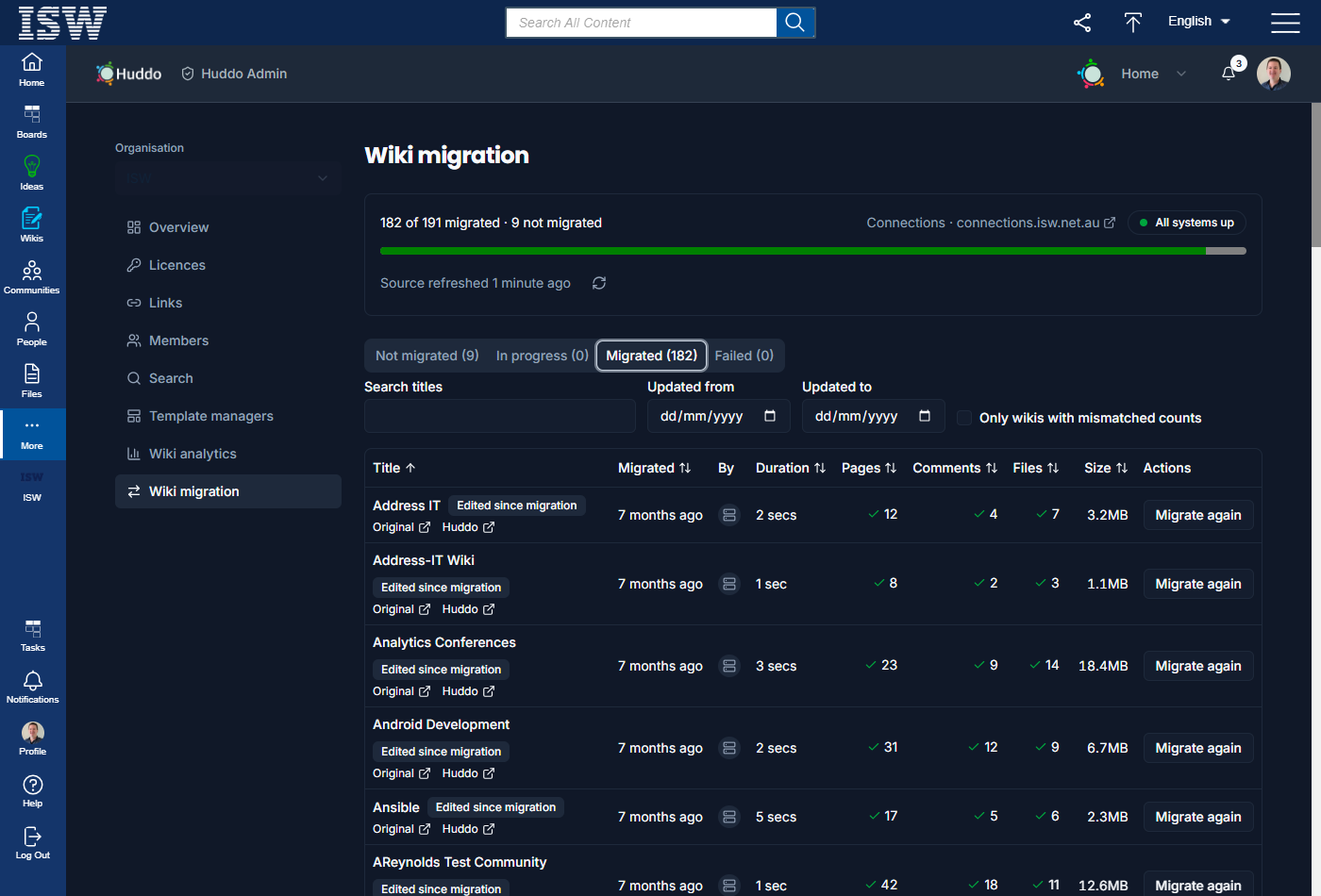
A wiki that migrated with something missing says N items not migrated. Click it for the list (the first ones are listed, then and N more):
| Item | What happened |
|---|---|
| Attachment | the file was missing from the source, so it was skipped and its link left as it was |
| Page version | an old version's content was missing from the source, so that version was skipped |
| Page content | the current content was missing, so the page has a notice instead of its text (see Migrate even if page content is missing) |
| Page left behind | Confluence only: the page's restrictions name nobody WikiShift could find, so the page, its comments and attachments were not migrated |
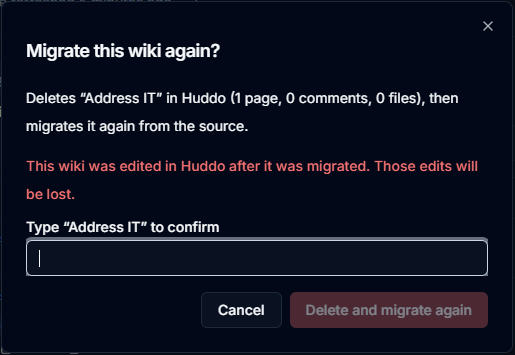
Edited since migration means someone has changed a page or whiteboard in the Huddo copy since it was migrated.
Migrate again deletes the Huddo copy (its pages, comments and files) and migrates the wiki again from the source. For a wiki edited since migration, you must type its title to confirm before you click Delete and migrate again: every edit made in Huddo is lost.
Failed wikis
Failed shows why and when each wiki failed. A wiki that was running when WikiShift restarted is marked failed too. If WikiShift could not delete what it had created for a failed wiki, the reason adds Rollback failed: a partial copy of this wiki is still in Huddo. Delete it in Wikis before migrating again. That wiki can't be selected until you do.
When another admin is working
If another admin queues wikis while you have the page open, it says Another admin has changed these wikis since this list loaded. Click Refresh before you act.
On startup
Migrations can also start when the service starts:
- Deploy with the source settings only. On each start WikiShift reads the list of wikis in the source and logs how many it found — a quick check that the connection works.
- Add
IMMEDIATELY_MIGRATE_IDSwith a few wiki IDs to try first, orIMMEDIATELY_PROCESS_ALL: "true"for everything, then upgrade the release. - Follow the run in Huddo Admin, or in the
wikishiftpod log, which logs how many wikis were queued and the reason for each failure. - Remove the startup setting and upgrade again, so a restart does not start another run.
Running it again
- A wiki that was already migrated is skipped, not updated or duplicated. Running everything again picks up only the wikis that failed or are new.
IMMEDIATELY_PROCESS_ALLalso leaves out wikis an admin cancelled; migrate those from Huddo Admin. - To migrate a wiki again from scratch, use Migrate again on the Migrated tab, or add its ID to
PURGE_MIGRATED_IDSas well asIMMEDIATELY_MIGRATE_IDS. WikiShift deletes the Huddo copy first, then migrates it. - If a wiki fails part-way, WikiShift deletes what it had created for it, so it can simply be run again. If that clean-up fails too, the log and the Failed tab say so; delete the wiki in Huddo before you retry.
- If an attachment file is missing from the mounted folder, it is skipped and its link left as it was. If every file is missing, the wiki fails with a message to check the mount.